Listen to the song created by Tunesona!

Staring at a blank page and can't come up with lyrics? Need to quickly generate freestyle lyrics? Or have you written lyrics but feel they're not good enough?
An AI lyrics generator can help you solve these problems and inspire your writing.
Tunesona is my go-to lyrics generator. Its 4 lyric generation methods cover from random to professional creation. Whether I want random song lyrics or carefully crafted lyrics, it can meet my needs.
Introduction
- Part 1. Tunesona: Best AI Lyrics Generator with 4 Powerful Methods [Free]
- 1.1 Generate Standalone Song Lyrics
- 1.2 Fully Random: Get Surprise Song Lyrics
- 1.3 Guided Generation: Input Your Ideas
- 1.4 AI Polish: Refine Your Existing Lyrics
- Part 2. 2 Other Lyrics Generators Worth Trying
- Part 3. FAQs About Lyrics Generator
Part 1. Tunesona: Best AI Lyrics Generator with 4 Powerful Methods [Free]
Tunesona is the most flexible AI lyrics generator I've ever used for creating AI music, offering 4 different lyric generation methods. Whether you're looking for inspiration or already have a draft that needs polishing, Tunesona can help you.

- Offers multiple lyric generation methods to meet the needs of different users.
- Includes complete song structure, ensuring high-quality lyrics.
- From completely random to generating lyrics based on your ideas.
- Allows you to specify themes, moods, and styles.
- Suitable for breaking through creative blocks and stimulating creativity.
- Supports multiple rounds of iterative optimization and lyric rewriting.
Next, I will introduce in detail the use cases and actual effects of each method.
1 Generate Standalone Song Lyrics
This is an option Tunesona AI Music Agent specifically designed for users who just want lyrics. It doesn't generate music, only complete lyrics, including verses, choruses, bridges, and other full structures.
Its overall quality is quite good, far surpassing other lyrics generators I've tried before.
Most importantly, the generated lyrics don't have that typical AI feel. Not every line rhymes, and it doesn't pile up fancy but empty words.
How to generate lyrics with this way?
Step 1 Visit Tunesona AI Music Agent and collect your lyrics writing credits.
Step 2 In the dialog box, select the Write Lyrics option and describe the lyrics you want.

Step 3 Click send, wait for about ten seconds, and Tunesona will generate lyrics for you.

Step 4 If you are not satisfied with a particular section, you can ask Tunesona to regenerate that specific paragraph, or adjust the style and mood.
Like this: Rewrite these: "Empty clocks and open sky, we just laugh and let time slide," and keep the rest.
Step 5 After optimization and adjustments, you can copy the lyrics for music creation, or continue to let Tunesona generate songs.
- Suitable scenarios
- Already have a melody and only need the lyrics.
- Looking for inspiration for songwriting.
2 Fully Random: Get Surprise Song Lyrics
This method is best suited for when you're completely out of ideas and want a surprise. In Custom mode, imply click the Random button and Tunesona will create unexpected lyrics. From style to mood, it's entirely up to it.
I often use it to break through creative blocks, but the quality of the generated random song lyrics varies greatly. Some are fantastic, while others are quite poor.
How to generate lyrics with this way?
Step 1 Select Custom mode and click the random button. Tunesona AI Music Agent will quickly generate lyrics with the complete song structure.

Step 2 View the random lyrics. If you like, use or save them. If you don't like, click again.
Step 3 You can try multiple times until find a random result that inspires you.
- Suitable scenarios
- Completely lacking creative ideas.
- Needs random song lyrics for practice.
3 Guided Generation: Input Your Ideas
This is my most frequently used method. In Custom mode, you can enter ideas, descriptions, or keywords, and then click the generate button. Tunesona will generate a song and lyrics based on your input.
This way is highly flexible. You can provide a very detailed description, or just a general direction. It can accurately understand and generate lyrics that match the description.
How to generate lyrics with this way?
Step 1 Select Custom mode and click the Generate button.

Step 2 Briefly or in detail, describe your idea in the input box. It can include the theme, mood, style, keywords, and music parameters.
Step 3 Select the language you need and click the Generate lyrics button.
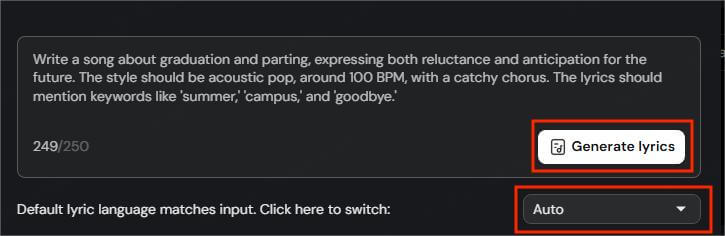
Step 4 You can manually edit the lyrics in the text box, or click the Optimize button to let AI refine them.
Step 5 Once satisfied, click Use these lyrics and continue inputting styles to generate the song.

- Suitable scenarios
- Have a general idea but needing AI to fill in the details.
- Want lyrics with a specific theme or mood.
4 AI Polish: Refine Your Existing Lyrics
This is one of Tunesona's most useful features. If you've already written a draft of lyrics but feel some parts aren't quite right, paste the lyrics in and let the AI polish them for you.
Tunesona will optimize your original lyrics, preserving your core ideas and style, but refining the expression, improving rhymes, and enhancing emotional impact. If you're not satisfied with the result, you can continue to adjust it.
I usually polish it 2-3 times until I'm satisfied.
How to generate lyrics with this way?
Step 1 Select Custom mode, paste the lyrics you wrote into the input box, and click the Optimize button.

Step 2 Tunesona AI Music Agnet will refine your original lyrics and return an optimized version.
Step 3 You can also paste the lyrics into the dialog box and add instructions after them.
I recommend this method, as it allows you to input precise modification suggestions.
Step 4 Compare the original and refined versions. If you are still not satisfied, you can continue to adjust them through dialog.
- Suitable scenarios
- A draft of lyrics is available but not satisfactory.
- Optimization is needed in rhyme, rhythm, or emotional expression.
Part 2. 2 Other Lyrics Generators Worth Trying
Besides Tunesona, I've used other lyrics generators. The following two are worth mentioning.
1 DeepBeat
Site: https://deepbeat.org/
DeepBeat is a freestyle lyrics generator focused on rap music. Its unique feature is that it analyzes a large number of existing rap lyrics samples and combines them with your input to generate rhyming rap lyrics.
You can input any words, and the AI will automatically complete or continue creating. You can also choose themes and keywords, and even generate Finnish lyrics.

- Based on extensive training with rap lyrics.
- Allows input of starting sentences or keywords.
- Free to use online.
- Requires repeated adjustments.
- Poor user interface.
2 Song Lyrics Generator
Site: https://www.song-lyrics-generator.org.uk/
Song Lyrics Generator is a simple and straightforward online tool whose core function is to help users quickly generate song lyrics. You can choose your desired lyric style based on genre and artist, and then fill in the required information in a form, such as lyric length and narrative perspective.
Finally, the tool automatically generates complete lyrics including the verses and chorus structure.

- A wide variety of music genres and artists.
- Customizable lyrics.
- Free to use online.
- Excessive ads interferes with creative work.
- Limited flexibility.
Part 3. FAQs About Lyrics Generator
1 Can AI really write good song lyrics?
Yes, but the quality depends on the tools and your input. High-quality lyrics generators like Tunesona can produce natural and fluent lyrics.
2 Is there a free lyrics generator?
Of course. For example, Tunesona offers free credits, and DeepBeat and Song Lyrics Generator are completely free.
3 Can I generate lyrics for freestyle or rap?
Yes. Tunesona can generate lyrics in any style, including freestyle and rap. DeepBeat is a dedicated rap lyric generator.
4 How do I make AI-generated lyrics sound more natural?
First, use conversational language and avoid clichés when typing. Second, manually optimize the lyrics. Finally, incorporate your own experiences to make the lyrics more personal.
Conclusion
A good AI lyrics generator can be your creative partner, inspiring your creativity.
However, the best works often combine human creativity with AI assistance. You can use these lyrics generators to break through creative blocks and optimize expression, but ultimately, what truly moves lyrics is your own emotion and story.
Try it now, your next lyric is waiting to be written!